
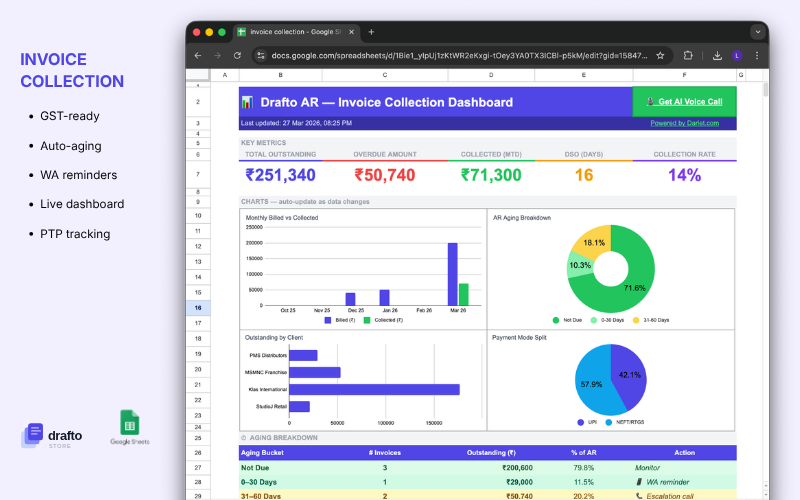
Chase every rupee. Miss nothing. One Google Sheet.
A complete accounts receivable collection tracker built in Google Sheets. Client list, invoice log, follow-up tracker, payment status, and collection summary — all connected, all updating automatically. No software subscription. No per-seat pricing. Just open, enter your invoices, and start collecting.
📋 Every invoice. One place.
Log every invoice with client name, invoice number, amount, due date, and payment terms. The sheet automatically calculates how many days each invoice is overdue so you always know what needs attention first.
📞 Follow-up log built in.
Record every call, WhatsApp message, and email against each invoice — date, mode, outcome, and next follow-up date. No more trying to remember who you called and what they said. Every conversation is on record.
🔴 Overdue ageing at a glance.
Invoices are automatically bucketed by age — 0–30 days, 31–60 days, 61–90 days, and 90+ days. You can see your entire overdue exposure in one view and prioritise the high-risk accounts before they go cold.
💰 Partial payments tracked to the rupee.
Record partial payments as they come in. The sheet calculates the remaining balance and updates the invoice status automatically — Unpaid, Partially Paid, or Paid. No manual recalculations.
📊 Collection summary dashboard.
Total invoiced, total collected, total outstanding, and overdue by ageing bucket — all summarised at the top of the sheet. Share it with your team or your manager without any extra formatting work.
——————————————————————
What’s included
- AR Collection Sheet.xlsx — works in Google Sheets and Microsoft Excel 2016 and above.
- Setup Guide PDF — step-by-step instructions. Ready to use in under 10 minutes.
What’s inside the sheet
- Invoice Log — client, invoice number, amount, due date, days overdue, and status
- Payment Tracker — partial and full payments recorded against each invoice
- Follow-up Log — every call, message, and email with date, mode, and outcome
- Ageing Buckets — automatic bucketing of overdue invoices by age
- Collection Dashboard — live summary of total invoiced, collected, and outstanding
- SETUP — configure your client list, team members, and follow-up modes
——————————————————————
Requirements
Google Sheets (free) or Microsoft Excel 2016 and above. Works on any device — desktop, tablet, or mobile.
Stop chasing invoices. Start collecting them.
No software to set up. No training required. No recurring fees. Open the sheet, enter your invoices, and know exactly who owes you what — today.
Suresh Agarwal –
I was tracking 40+ invoices on paper. Now everything is on this sheet — who paid, who hasn’t, how many days overdue. Saved me hours every week. Highly recommend for any trading business.
Meena Krishnaswamy –
The ageing bucket view is the best part. I can see at one glance which clients are 60+ days overdue and call them first. Follow-up log also useful for keeping my team accountable.
Anil Mehta –
Running a small wholesale business. This sheet replaced my accountant’s manual follow-up register. Partial payment tracking is accurate and the dashboard updates automatically. No complaints.